Showing posts with label Utility. Show all posts

Thursday, June 30, 2011

Nokia E6 Business Phone Announced

There is one stand-out feature of the newly announced Nokia E6. It's not that it will run Symbian Anna out of the box, or that its touchscreen will have a pixel density of 326ppi. No, the stand-out feature for this business phone is a claimed battery life of 14 hours talk time and up to one month standby.

image

Yes the E6 may have the styling of a BlackBerry but it is very much its own phone. As a business phone, the E6's battery life will win it a lot of friends, considering most smartphones these days offer little over a days use before giving up the ghost. A full QWERTY portrait keyboard sits beneath a 2.46in VGA touchscreen, which boasts an incredible pixel density of 326ppi and supports pinch-to-zoom. Under the hood the E6 is powered by an ARM1176 680MHz processor, which is helped along by a Broadcom graphics accelerator.


image
 
The E6 includes an ambient light sensor, compass, orientation sensor and proximity sensor. The phone has 8GB of inbuilt memory and supports microSD cards up to 32GB. It also comes with a lot of business-orientated features such as Exchange, Communicator Mobile and SharePoint access. The E6 also features the now almost trademark 8MP camera, found on most of Nokia's smartphones.

The E6 will appeal to a lot of business users, or general users for that matter, considering its huge battery life in comparison to some of the smartphones out there. It will begin shipping in Q2 of this year with a price point of £345.

Source: Forum.Nokia

Wednesday, June 29, 2011

MAGELLAN® PERSONAL GPS NAVIGATION SYSTEM

MAGELLAN® PERSONAL GPS NAVIGATION SYSTEM

4.7 INCH SCREEN AND POWERFUL NAVIGATION FOR WHEREVER ADVENTURE TAKES YOU!

The Magellan RoadMate 1470 includes many premier features, starting with Magellan's exclusive OneTouch™ favorites menu, QuickSpell® with SmartCity search, and highway exit point of interest (POI) search, to name a few. Magellan's attention to detail delivers a superior user experience.

Intuitive and robust navigation The RoadMate 1470 lets you bookmark your favorite destinations and searches with the OneTouch favorites menu so you can access them anywhere you travel. With a single touch, find your favorite café or restaurant when you're traveling within any city.

QuickSpell and Smart City search help you quickly enter addresses and narrow your address and city searches, making destination entry easy. Multi-destination routing with route optimization lets you plan your trip with multiple stops in the order you want or optimize a trip for the most efficient route, helping you save time and money.

Safety first on the road means you can keep your eyes on the road as you drive because spoken street name guidance announces the street name along with audible turning cues. Highway lane assist offers visual aids to point you in the right direction and ensure that you'll choose the correct lane well before your next turn.

Should your vehicle unfortunately break down as you travel, the AAA locate screen provides your location so help will know where to find you. Get support fast with the AAA Member Roadside Assistance 1 phone number and your location displayed on the RoadMate 1470 screen.

You're ready to travel with preloaded maps and points of interest for the United States, Canada, and Puerto Rico that make the Magellan RoadMate 1470 ideal for both business trips and vacations.

With millions of points of interest at your command you can easily locate gas stations, restaurants, ATMs, coffee shops, and much more. If you need more information or you want to save money, select the AAA search menu after your search entry. AAA TourBook® provides ratings and descriptions on AAA approved places to stay, play, dine, and save.

When you're traveling down the Interstate and need to find gas, food, or lodging in a hurry, touch the highway exit POI icon to see which upcoming highway exits have the services you need.

Do you often find yourself tied up in traffic? The RoadMate 1470 is Traffic Link compatible, offering live onscreen traffic-incident reports. (The Traffic Link accessory is sold separately).

Turn it on and go!™ The Magellan RoadMate 1470 is loaded with premier features you'll need to get you where you want to go.

Features:

  1. 4.7-inch color touch screen
  2. NAVTEQ maps
  3. OneTouch™ favorites menu
  4. AAA TourBook® feature
  5. Highway lane assist signs feature
  6. Spoken street names and directions
  7. QuickSpell® with SmartCity search
  8. Multi-destination routing feature
  9. Personalized search icons let you easily bookmark favorite destinations
  10. Preloaded maps of United States, Canada, and Puerto Rico.
  11. Millions of points of interest
  12. Highway exit POIs
  13. Branded POIs
  14. Customizable route method lets you select the shortest distance, fastest time, most use of freeways, or least use of freeways to customize your route.
  15. Address book enables you to create and store contact information.
  16. Auto night view feature
  17. Automatic re-route lets you quickly get back on track in case you missed a turn.
  18. Rechargeable battery
  19. Demo mode
  20. Includes:
    Windshield Mount
    Vehicle Power Adapter
    USB Cable
    Alcohol prep pad
    User handbook
    Model No: ROADMATE 1470 (R)

Monday, June 27, 2011

Bluetooth Keyboard case for Samsung Galaxy Tab P1000

image

Specifications:

Suitable for: Samsung Galaxy Tab P1000 (iPad compatible)

Bluetooth version: V2.0

Operation distance: Up to 10m

Operation voltage: 3.0-5.0V

Lithium battery capacity: 450mA

Working current: Less than 5.0mA

Standing current: 2.5mA

Sleeping current: Less than 200uA

Charging current: Over 100mA

Standing time: 60 days

Charging time: 4-4.5 hours

Uninterrupted working time: 45 hours

Lithium battery span: 3 years

Key life: 5 million strokes

Key dynamics: 80 ± 10g

Material: Silicon (the keyboard); synthetic leather(the case)

Product dimensions: 220x140x32mm

Product weight: 331g

Package dimensions: 320x168x38mm

View Detail to Buy  :  Bluetooth Keyboard case for Samsung Galaxy Tab P1000

http://www.tripleclicks.com/detail.php?item=84468

Saturday, June 11, 2011

Make Portable Applications or Software Being

Portable applications into practical solutions for you who frequently use the PC, because no longer need to carry a notebook everywhere. Simply tenteng important documents and carry only the commonly used programs. Everything can be stored in a USB flash drive or portable hard disk.

When arrived at their destination, whether it be office, place of presentation, or cafe, you do not have to worry if the computer that will be used do not have the required software. Live plug the portable drive, then everything matters so smoothly. The application of this type would not suck up hard disk space because the size is tiny.

The problem is, there are times when a portable application that you need not available in cyberspace. If condition like this, you can turn it into a version of "tenteng" independently.

Easy with Portable Application Creator

Many ways to make their own portable applications. One way is to use an application Portable Application Creator - 0982 Beta DOWNLOAD Portable Application Creator https://rapidshare.com/files/2722441371/Portable_App_Creator_0__98__2_beta.zip

This application can help you to install an application into USB flash disk and make it portable alias can be used on any computer without the need to be installed again. Here's how:

1. Download the first file, then extract to your hard disk. Next, make sure the flash disk that is used for the installation of an application already plugged into the USB port on your PC. Then open the extracted folder earlier.

2. Double-click the file "Compiler.exe PAC" until a dialog box "PAC Compiler" appears. This application will find applications in hard disk AutoIt.exe. If no, the application will offer to download it from the internet. Click [Yes]. Tunggui until the application downloaded in full. If so, click [Done].

3. File "PAC Compiler.exe" will be changed to "Portable App Creator.exe". Double click the file. In the dialog box "Portable App Creator", select your flash disk drive in the "Portable devices located at the drive".

1

4. Click [Next]. Click [Browse ...], and then locate the file installer of software that will be portable. Click on the installer file extension. Exe, and select [Open]. Here, we try to use the application installer files CC Cleaner. Click [Next].

1

5. Now you will be faced in the installation wizard. Click [Take 1st Shot]. If the process is complete, click [Install Applications]. In this process, applications will be portable to be installed.

1

6. Make sure you select the directory of the flash drive as the "Destination Folder" during installation. If not, the application will not be installed to a flash drive. Follow the installation process to its conclusion. Close the installation wizard, then return to the wizard in the "Portable App Creator".

1

7. Click [Get Shortcut Info]. Determine the application files are installed on the flash drive in the "Get the location of the application to run" by clicking [Browse]> [Open]. Determine the location of the application shortcut in the "Get the location for the launcher." Click [Next]. Click [Open / Close] to test the application. If successful running, close the window aplikas

1

8. Click [Take 2nd Shot], followed by [Process Shots]. When finished, click the [Next]. Wait again until the key [Done]. Click on the button. Now the application has been successfully installed on the flash drive and can be used at any time and in the computer (Windows) anywhere.

Utilizing Universal Extractor & WinRAR

In addition to the above, you can also use Universal Extractor software (which can be downloaded from http://legroom.net/software/uniextract # download the 4.98 MB file size) and WinRAR compression software (trial version it can be downloaded from www . rarlab.com). Applications who want to be portable must be the installer files, with extensions EXE, not a program you have installed to a PC or other format. Let's get started.

1. Download and install Universal Extractor and WinRAR to the PC. Open Windows Explorer. Prepare the installer program that would be used as a portable application.

2. Store in a separate folder so easy. For example, we are using Mozilla Firefox installer file. Right-click the installer file and select [UniExtract to subdir].

3. Wait a few moments until the extraction process, as indicated by the emergence of the Command Prompt box.

4. If the previous show confirmation box containing the extraction mode option, select the top option, then click [OK]. Results after the extraction process is a folder with the same name as the installer file.

5. Open the extracted folder by clicking-dobelnya. If the lot contains a selection of folders, find the folder that contains files with extensions EXE application.

6. In Mozilla Firefox, the application file named "firefox.exe" and located in the folder "nonlocalized". Selection of all the contents of that folder by pressing [Ctrl] + [A], then right-click your mouse and select [Add to archive ...] for compressing data via WinRAR.

7. In WinRAR box that appears, fill in the name of the portable application file on the "Archive name". Click [Create SFX archive]. On the menu "Compression method", select [Best]. Next, click [Advanced] followed by clicking the [SFX Options ...].

8. On the "General" tab, fill in box stuffing "Run after extraction" with the file name extension EXE application that you found in Step 3. For Firefox here, fill it with firefox.exe.

9. Click on the tab [Modes], then select [Unpack to temporary folder]. Click the [Hide all] in "Silent mode", and [Overwrite all files] on the "Overwrite mode". Click [OK] and click [OK] again on the dialog box Archive name and parameters. Wait a few moments until the compression process is complete.

10. Now in the folder that you manage will emerge a new file with the EXE extension that match the name that was entered in Step 4.

11. Well, your application has now become portable. Just insert your EXE file into the flash drive and run directly on any computer, by double-clicking the file portable applications.

1

Wednesday, June 8, 2011

Advanced SystemCare 4 Review by Me

Advanced SystemCare 4 Info:

Advanced SystemCare 4 is software that serves to maximize PC performance. Actually a lot of software optimizing such as TuneUp Utilities, TweakNow PowerPack 2011. But on this occasion I am going to review Advanced SystemCare 4, because the new release and just coincidentally the date of release of this program the same as the date of my birthday, he..he..he..

System Requirements:

Operating Systems

  • Microsoft ® Windows ® 7 (32-bit and 64-bit) Starter / Home Basic / Home Premium / Professional / Ultimate
  • Microsoft ® Windows ® Vista (32-bit and 64-bit) Starter / Home Basic / Home Premium / Business / Ultimate
  • Microsoft ® Windows ® XP (32-bit and 64-bit) with SP2/SP3 or Home / Professional / Media Center
  • Microsoft ® Windows ® 2000
  • 300 MHz processor or faster processor
  • 256 MB of RAM
  • 30 MB of free hard disk space

Main Program:
Well the first thing I will review it first from the Main Program ..
Advanced SystemCare 4 has many Skin primary.

The following picture,,

White Theme:

1

Default Theme:

1

Blue Theme:

1

Asian Theme:

1

Theme Office:

1

Wood Theme:

1

Steady His steady right Skinn.

This feature is in the Quick Care: 1

This feature is in the Deep Care: 1

This feature is in the Turbo Boost:

1

This feature is in the Tools:

1
Note: I use AdvancedSystemCare 4 PRO, and probably will have different features if you use the free version .. AdvancedSystemCare Hehheheh

Source Download:

  1. http://download.cnet.com/Advanced-SystemCare-Free/3000-2086_4-10407614.html
  2. http://www.iobit.com/advancedsystemcareper.html

Friday, June 3, 2011

Best Mobile Phones in 2010

HTC Hero

The strong design, slick social networking skills and beautiful implementation of the Android operating system with the ‘Sense’ UI has seen the HTC Hero
Packing a 5-megapixel autofocus camera, 3.2-inch capacitive touchscreen and GPS in a unique, angular form factor, the Hero is possibly the best phone to demonstrate what Google’s new operating system is really capable of.
Winning the hearts and minds of those not swayed by the iPhone, the Hero is easily the next best thing.
——————————————————————————
HTC HD2

Representing Windows Mobile as the Hero has for Android, the ‘wow’ factor of the HTC HD2 is definitely marrying Microsoft’s mobile operating system to that mammoth 4.3-inch touchscreen display.
Bringing the smooth, refined Sense user interface as well as the first phone to offer multi-touch on Windows Mobile 6.5, the HTC HD2 is equally at home being a business device as it is a multimedia powerhouse.
With a 5-megapixel lens and dual-LED flash, GPS and support for apps to Marketplace for Mobile, the HD2 is the perfect poster boy for the next generation of Windows phones.
—————————————————
Apple iPhone 3GS

Getting the design so right first time has given Apple the ability to reiterate rather than revolutionise, and the iPhone 3GS is the second update to the groundbreaking formula.
Expanding on the iconic device with a 3 megapixel camera, video recording, voice controls and up to 32GB of storage, the Apple iPhone 3GS is able to do it all, faster.
—————————————————
Samsung Genio Touch

The Samsung Genio Touch continues the popular range with a cheap and cheerful handset that brings touch screen joy without the price tag.
The 2.8-inch display offers the same TouchWiz user interface spotted on higher end devices, and with customizable covers as well as a 2 megapixel camera, the Genio Touch punches above its weight in terms of both looks and specs and has customers snapping it up in droves.
—————————————————
Sony Ericsson Satio

A 12.1 megapixel wielding device that combines the strongest features of the Cybershot range, the Sony Ericsson Satio compliments them with the latest Walkman functionality, wrapping them together with a slick full touch Symbian powered user interface.
The 3.5″ display is clear, crisp and responsive to the touch, and the built-in 3G connectivity and GPS set it amongst the strongest smartphone contenders.
Strong advertising and an arresting form factor have seen the Satio fly off the shelves in the last few weeks, and showing little sign of slowing down.
—————————————————
Palm Pre

Already a million-seller in the United States, the Palm Pre is a well-kitted device with a 3.1-inch touchscreen and 3.1 megapixel camera, a socially savvy handset that pulls contact information to be automatically from networking sites including Facebook.
The combination of cute pebble-shaped design, slide-out QWERTY keyboard
—————————————————
Nokia 5800 XpressMusic

The Nokia 5800 XpressMusic is the epitome of cool by committee. With a plectrum for a stylus, endorsement from today’s fashionable young things and a full touch interface, the 5800 was bound to be a hit.
A music phone at heart, the Nokia 5800 XpressMusic ticks all the specs boxes with 3G connectivity, Wi-Fi support, a 3.2 megapixel camera and a hefty 3.2-inch high resolution touch display.
Your music selection is handled by an 8GB memory card, and a 3.5mm audio jack means that your favourite headphones can be plugged in with little trouble.
Outselling the iPod at one point as the UK’s biggest music player, the 5800 is one hot handset.
—————————————————
Nokia N900

A late entry for the new flagship phone from Nokia, as the N900 just makes it to stores in time to be a late Xmas present.
Taking cues from Nokia’s range of internet tablets, the N900 delivers a close-to-desktop browsing experience, as well as offering cutting edge smart phone functionality.
The N900’s gorgeous 3.5″ touchscreen, slide-out QWERTY keyboard and 5 megapixel Carl Zeiss lens all impress, but it is the brand new experience that Nokia’s Linux-based Maemo platform offers that has early adopters in a frenzy.
—————————————————
LG Chocolate BL40

The latest in LG’s exclusive Black Label series, the BL40 boasts a 4″ LED touch screen, a 5-megapixel autofocus camera and an exciting new user interface.
Watch movies without the borders and browse web pages in all their horizontal glory, to the screen’s unique 21:9 widescreen ratio, also giving the Chocolate BL40 an tasty form factor.
The quirky shape and multimedia credentials have definitely given shoppers a sweet tooth in recent months, with the Chocolate selling strongly since its September release.
—————————————————
Blackberry Curve 8520

Courting the casual user and breaking taboos seem to be the primary aims of the Curve 8520, getting rid of the famous trackball and replacing it with optical pad, and also becoming the first to have BlackBerry dedicated media buttons.
The Curve 8520 is still very much a messaging device, sporting the familiar QWERTY keyboard and e-mail functionality that the Blackberry brand has become famous for.
With additions like BlackBerry App World and a headphone jack to appeal to feature phone fans, the Curve 8520 strikes the perfect balance of fashion accessory and connected device. snag an armful of ‘Best Phone’ awards this year, and rightly so. and the debut of their smooth new ‘Web OS’ user interface has been snapped by many shoppers looking for a worthy alternative to Apple’s iPhone.

Tuesday, May 31, 2011

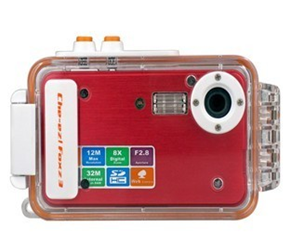
Digital camera - Water proof 5mp digital camera

Water proof 5mp digital camera

Introduction: Manufacturer Specifications Water proof 5mp digital camera 
Main Function: Waterproof digital camera
Materials: Black all-metal camera, translucent waterproof case

LCD screen: 2 Inch LTPS TFT LCD
Storage media:
Internal: 32MB
External: SD Card (8GB Max)

Lens:
F2.8, f=7.23mm
Zoom: 8x Digital
Shutter: 1/10 ~ 1/1000 sec
Sensor sensitivity: Auto

Picture Camera
- Image Format: JPEG
- Resolution: 12MP (Interpolation), 5MP (Native), 3MP, 1MP, VGA
- Image Quality (compression): Super Fine, Fine, Normal
- Snapshot Options: Metering, Timer, Continuous Shot
- Picture Settings: Effects, White Balance, Date Stamp
- Flash: Auto, ON, OFF
- EV: 12 steps (+2 to -2)
- Banding: 50Hz, 60Hz

Video Camera
- Recording Format: AVI
- Resolution: 640x480, 320x240 (Selectable 30/15 FPS)
- Video Settings: Digital Zoom, White Balance
- Banding: 50Hz, 60Hz

Power Supply: Li-ion Battery (recharge via USB)

PC Interface: USB

Compatible Systems for file transfer via USB : Windows 98SE, 2000, NT, XP, Vista (32 bit version only) , Windows7, Mac OS X+

Dimensions: 130mm x 38mm x 77mm (L x W x D) - with all weather case on

Product Notes
Internal photo and video management - delete, lock, review, resize
Lanyard slot
Package Contents
Model CVFU-K02-Black Waterproof Digital Camera
North pole wrist strap

Driver CD
User Manual - English
Mini-USB to USB cable

View Detail to Buy  :  Water proof 5mp digital camera

Digital-Camera HJC - sony-H7-camera-8.1MP

image

Introduction: Screen
Digital-Camera HJC - sony-H7-camera-8.1MP : LCD 2.5" (115K Pixels TFT LCD Screen)

Audio
Lens Type --- Carl Zeiss Vario-Tessar Digital Zoom --- 0-2.0X (Precision) Still Image Mode(s) --- Burst, Normal JPEG (Fine/Standard), Bracket Exposure Viewfinder --- 0.2" 201k LCD, TTL EVF Flash Mode(s) --- Auto, Forced On, Forced Off, Slow Synch Exposure Compensation --- +/-2.0 EV, 1/3 EV Step Increments White Balance --- Automatic, Cloudy, Daylight, Fluorescent 1, Fluorescent 2, Fluorescent 3,Incandescent, Flash, Manual Movie Mode(s) --- MPEG VX Fine with Audio (640x480 at 30fps) (MPEG VX Fine requires Memory Self Timer --- Yes (10 seconds, 2 seconds, Off) USB Port(s) --- Yes (Supports USB 2.0 ) Audio/Video Output(s) --- Yes via Mutli-Use Connector Lens Construction --- 13 Elements in 8 Groups, 4 Aspheric Elements/ 1 ED lens Aperture Range --- Auto, (f2.7-5.6W)/(f4.5-8T) Shutter Speed --- 1/4-1/4000 sec. (Auto), 1-1/4000 sec. (Program Auto), 8" - 1/2000 (Aperture Priority), 30" - 1/4000 (Manual/Shutter Priority) Focus --- 9 Area Multi-Point AF, Monitoring AF, Flexible Spot AF Aperture Range --- Auto, (f2.7-5.6W)/(f4.5-8T) Operating System Compatibility --- Microsoft 2000 Professional, Me, XP Home and Professional;Macintosh OS 9.1/9.2/OS X (10.0-10.4) Size: 109.5 x 83.4 x 85.7 mm

Memory capacity
Recording Media --- 31MB internal Flash Memory, optional Memory Stick DUO Media, optional Imaging Device --- 1/2.5" Super HAD CCD?

Photo strorage
Megapixel 8.1 MP
Power and battery
Battery Type Lithium-Ion NP-BG1
Weight
Gross Weight:1.45kg

Manufacturer and origin
Made in China (original equipment manufacturer)
Package induded
NP-BG1 rechargeable battery, BC-CSG battery charger, Flower Lens Hood, Lens Adaptor Ring, Lens cap with strap, A/V and USB multi-connector cables, Shoulder strap, Remote Commander, Software CD-ROM

View Detail to Buy :  sony-H7-camera-8.1MP - Digital-Camera HJC

Sunday, May 29, 2011

Apple iPod touch 32 GB (4th Generation) NEWEST MODEL

Apple iPod touch 32 GB (4th Generation) NEWEST MODELThe iPod touch is frequently called an iPhone without the phone. However, until now there have been several other features also missing in the iPod touch besides the phone: a camera, GPS, magnetometer (compass), and some newer amenities from the iPhone 4: front-facing camera, high resolution "Retina display" as it has been dubbed, and the powerful 1GHz A4 processor--indeed a necessity to keep up with multitasking.

Having had a chance to spend a little time with a review model gives me a chance to share the experience with you a bit early (before my own arrives). I'll take you hands-on with the new model, plus I'll share from my past two years of iPod touch ownership altogether, especially for those who haven't yet owned (or been owned by) one of these mobile gems.

I've also hidden a treasure trove of info on how you can legitimately download tons of quality apps for free. First though, let's quickly cover what's new.

  • Faster 1GHz A4 Processor - to keep up with the high demands of multitasking
  • Ultra high resolution "Retina display" - packs a 960 x 640 resolution at 326 pixels per inch
  • 15% larger battery - 3.44 Whr/930 mAh plays 7 hrs of video & 40 hrs of audio
  • Rear-facing camera - supports 960 x 720 sized photos (0.6 megapixels), plus 720p HD videos
  • Front-facing VGA-quality camera - VGA-quality is a resolution of 640 x 480 (0.3 megapixels)
  • 3-Axis Gyroscope - allows for higher precision and more motion gestures
  • Wireless N - Connect faster and go farther than ever, with this WiFi device (requires a router with 802.11n)
  • Built in microphone - but Apple reverted back to using the remote- and mic-less earphones
  • Game Center - Apple's own social gaming platform
  • Sleep/Power Button - it's been moved to the right, but not improved beyond that
  • Thinner, lighter than ever

Note - Memory remains at the same 256MB despite several unconfirmed sources touting 512MB. There's also no vibrate module.

Unlike last year's iPod touch update, this one's a complete overhaul to the entire line. Last year, the new models didn't change in appearance. On the inside, faster processors and double-memory were added to the 32GB & 64GB models, but the 8GB got left out. Not this time. Buying the new 8GB iPod touch indeed gets you all the new goodies. You'll also pay thirty bucks more than before, so consider buying the 32GB model instead. You'll get 400% of the storage capacity for only 23% more coin!

View Detail : Amazon Store

Wednesday, March 4, 2009

A term on the Megapixel Digital Camera

The greater a Megapixel camera, the more good quality pictures. This is the biggest myth in the camera world, and that it is not entirely accurate. Companies and camera stores actually clearly know this, but they just continue to try to maintain this perception is wrong, not only maintain, but they would continue to strive to inculcate these ideas to the consumer. Why? as this that cause companies and camera stores that can benefit most.

Simply add the number of its pixels, with no other changes are more meaningful, they can create a new type of camera, and the consumers who deceived the race for the race to upgrade its camera.

While it is important to REMEMBER megapixel high, if not accompanied by changes in the size of the sensor architecture changes or changes in the quality of the camera lens, the image quality of the camera is worse. so the function of the megapixel that is actually big for what? the key is on the Per-scale. The greater the resolution of a camera (megapixel), then we can print images with a larger size, but its problems, the needs of the average layman the only print in the size of 4r or 10R alone, that can be done by a very good camera with 4 megapixel resolution.

In addition to the amount of per-print, large resolution also can be useful when you and I often do in the Crop foto. So if you are not a user of print or cropping often do, with a 6 megapixel camera is more than enough.

Tuesday, March 3, 2009

RoboCopy GUI Version

On windows server 2003 Resource Kit Tool called RoboCopy there are tools that can be used on your Windows XP system. RoboCopy copy of the tool is very powerful that allows you to perform the copy operation is more complex than the standard tools of Windows XP copy. For example, with RoboCopy image you can create a folder tree structure on the same computer or network drive. The only shortfall is RoboCopy you must run it from command line.Ini to use RoboCopy means you must remember and type a lot of switch and parameters that can really take advantage of all its fiture.
Fortunately, a system engineer group called Microsoft MSN Search Derk Benisch, create add-in called RoboCopy GUI. Its user interface which consists of six tabs to make configuration and use of RoboCopy very easy.
Not only to its interface that provides configuration options via check boxes, radio buttons, text boxes and Browser dialog box, RoboCopy GUI can also save your settings so that the re-use of this tool become far easier. In addition RoboCopy GUI with file refrensi help and guidance to help you use all the capabilities RoboCopy. You can download the GUI from RoboCopy: http://download.microsoft.com/download/f/d/0/fd05def7-68a1-4f71-8546-25c359cc0842/UtilitySpotlight2006_11.exe. And remember that you need to first install the Microsoft.NET Framework version 2 before you install RoboCopy GUI.
Enjoying Happy

Thursday, February 26, 2009

Video Card Mainstream AMD PCI Express

PowerColor HD 2400 Pro
Tul Corporation as a manufacturer of video card Powercolor product, already many solutions to bring products from either the video card down to the class top-class. And now as the main partner of specialized production-based video card GPU AMD / ATI, Tul Corporation issued a one-class products to bottom, GPU Radeon HD 2400 pro. This series GPU, it will be suitable for selection as a media PC because it uses small form factor (low-profile) and also the affordability of the price is very interesting.
The design is very similar between the RV610 (HD 2400) and RV630 (HD2600), but its lack of the largest and also the main diferent is due to its performance are far more lower for the RV610. Then on the Video Card is one of the series or SCS3 Silent Cooling System 3 is the generation of ber-to-three. Fiture are marked with the use of passive components pendingan the level of its silence 0dB. The advantages are also added to the types of components with heatpipe cooling fin has in the cold end of the heatpipe. the class is usually for entry-level solutions using heatsinks on despite also using heatpipe.
Configuring video card in accordance with the overall reference design, with performance that is of course he will also have to be in the range of the average class.
Indeed vidoe card HD 2400 pro is not an option to upgrade in the performance, but more for the support of its latest graphics tehnologi all existing at this time. But need not be limited to the level of performance, because as the content of 2D can still be calculated. He indeed will be more suitable as a booster for the computer graphics compared to computer gaming HTPC. View Detail product Tul Corporation

Sunday, February 22, 2009

Learn Typing with The Fish

Rapidtyping Tutor 1.2.0.7

For if you only find this software to learn typing with the view that is very rigid, the Rapida Typing Tutor interface offers interesting form of animation that the fish will be loved by children.

In addition to exercise the option to choose the text to learn typing, you can also enter text as you wish. The availability of a virtual keyboard and voice instructions are easier for you in practice. When you finish exercise, the software with the option of five types of this language has a fairly complete statistics, including the accuracy, speed average per character, up to a total time.

One thing that is interesting enough, when you open other programs or doing other activation, this software will automatically make a pause, which means that the statistical accuracy of the time is guaranteed. One thing more, in the settings there are more than 10 types of structure type selection button keyboard that is adjusted in each country.

You are interested to use it. Please to see the software at : Rapidtyping Tutor 1.2.0.7

Special Day Reminders

Birth Reminder & Calendar 2

Like other software Reminder, Reminder and Calendar Birth 2 is useful to remember the important days in your life. To activate the software that is made with the Net Framework 2.0, you only need to double click on its icon located in the lower right corner of Windows desktop taskbar. Main menu is available there are three pieces, namely View Events, New Event and Print Month Calendar. The third works in accordance with the name of each.

New Event function to enter new events into the calendar. For the anniversary, this software to select the auto increment age.

Event view function to view a list of all events that have been stored previously.

In the Print Month Calendar, you can print a Reminder on the selected days. Before printing, you can do print preview. Unfortunately, this software is not equipped with an alarm facility. When there are events that will take place, only a small window will appear at the right bottom of the screen.

You are interested to use it. Please to see the software at:Birth Reminder & Calendar 2

Friday, February 20, 2009

Uninstall Completely

Ashampoo Magical Uninstall 2.82

Still with something special, that is easy to use, software company germany home offers a way to uninstall completely.

How the latest version of Ashampoo Magical Uninstall this is to compare the two conditions on the system, namely before and after the install program. All files and registry that are in the application that is installed will be a total and secure by this software.

When operating this software will be "hiding" in the taskbar at the bottom right corner of the desktop. To open the application, you only need to right click on the icon. Then you can perform a variety of settings and feature-run feature in it. A quite unique, when doing an uninstall program, initially all the files was not permanently deleted, but stored in a temporary storage folder. so if at any time you want to restore the programs that are in-uninstall, this can be done easily.

Conclusion:
This free software is able to guarantee the maximum performance.

You can download at : Ashampoo Magical Uninstall 2.82

Mobile PC with Windows Vista

HTC Shift CDMA Microsoft Vista Phone
Smartphone want a great mini-notebook and more cute? HTC Shift is a combination of both. An Ultra Mobile PC (UMPC) with Triband GSM Module and UMTS / HSPDA.
HTC Shift CDMA Microsoft Vista Phone
This phone also has two processors, the Intel Santa Rosa A110 CPU and Qualcomm. Operating system is also two, namely Windows Vista Business and Windows Mobile 6.
Behind a compact form factor of the DVD and weight 800 grams, hidden with a 40GB hard disk, 1GB DDR2 RAM, Webcam, Finger sensors and QWERTY keyboard. This keyboard is quite comfortable to use, even by those who have fingers the size of normal. 7-inch touch screen can digeser back and dimiringkan. When you activate the PC with the Vista operating system, the tasks were submitted to Intel processors. Unfortunately, less good ability batery, after two hours of use, batery discharged directly. Therefore, the HTC SnapVUE technology.
To read the email, calendar, SMS and cantact, Windows Mobile 6 will be working with Qualcomm processor with 64 MB of RAM. Meanwhile, Vista, and Santa Rosa is in sleep mode. In this way batery can survive much longer.
According to the HTC device is capable of active for 2 days for push mail and 11 days when the function is disabled. Didukungnya that connection, another connection between the UMTS and HSDPA, GSM Quadband with GPRS and EDGE. Not there is also a feature WLAN 802.11b / g and Bluetooth 2.0.Perangkat other can be connected to the HTC Shift to use USB 2.0.
Are you interested to see product details please visit : HTC Shift CDMA Microsoft Vista Phone-Amazon

Safe way to Improve the registry

AML Free Registry Cleaner 3

Either accidentally or deliberately, often in the registry in windows operating system does not become a regular. Moreover, if you do install and uninstall program. This can reduce the maximum performance that can be achieved by the system on your computer, sometimes you can even create a system crash. When a situation like this, you need to tidal panic. AML Free Registry Cleaner offers a very easy and safe to clean the Windows registry.

The first thing you should do is make backups of Windows registry, and then select the area to be scanned-in (such as Dll, invalid device reference, invalid file association and others). Scaning process be calculated fast enough, only takes less than 2 minutes 157 to find the problem in the registry. Next, you can delete or edit the registry is scanned.

Conclusion:
Software that works on windows 2000 system to the very top of this help you in the care of the computer system.

You are interested please visit and download to: AML Free Registry Cleaner