Showing posts with label PC. Show all posts

Wednesday, June 29, 2011

Hewlett - Packard reported to Launch 7 Inch Tablet, August

image

Hewlett-Packard rumored to be launching a line of new tablet, TouchPad next month. Interestingly, reports the Taiwan Economic News, reported that a month later, ie August, the HP is also going to release another 7-inch tablet.

Citing sources of information subkonraktor Invenctec Corp., said thatit has received orders from HP tablet device. Where a company based in Palo Alto was reported to have memerintankan much as 400,000 to 450,000 units per month from Inventec, which manufactures tablet PCs million for HP.

The source also claimed that the order consists of HP's 7.9-inch TouchPad which will be launched July 1. As for the other two tablets are presentto treat 7-inch screen also reported.

While unnamed sources from the 'Industry Insider' estimate that Inventec will be made and shipped about 3 million units of tablets for HP in 2011.

Monday, June 27, 2011

The Laptop Can Breathe More Easily

Actually, this tool has long existed in the laptop. However, I ignore because do not know the benefits. When there is a problem all the folders in a state of Read Only (can not be transferred and can not store files in it), I use it for fun because almost all of the antivirus does not detect the virus. Once cleaned using this tool, it turns out all back to normal folders. The files "junk"too, so the laptop can be cleaned more easily.

Apparently, despite using the free version, this tool is incredible benefits. Moreover, if we use the netbook. When it feels heavy, run this tool to completion, the netbook will feel lighter. If it is severe, there may be other causes. This tool is also useful to clean up all Internet browser cache, so that whenbefore the browser to remember your username and password, can be removed only with a single command.

How to use it?

Please download and install the application here http://www.piriform.com/ccleaner . Run the application and then click Analyze.

clip_image002

Wait until the process is complete.

clip_image004

When finished, click Run Cleaner.

clip_image006

If you're opening a browser, there is usually a command to close it. If not closed, the cleaning process on the browser's cache will be bypassed.

Once completed, there will be information on how big the file "junk" that had been cleaned.

clip_image008

If you've been using a laptop / netbook / computer, so its capacity can be cleaned very large files. Try it, because it is still free!

Wednesday, June 8, 2011

Advanced SystemCare 4 Review by Me

Advanced SystemCare 4 Info:

Advanced SystemCare 4 is software that serves to maximize PC performance. Actually a lot of software optimizing such as TuneUp Utilities, TweakNow PowerPack 2011. But on this occasion I am going to review Advanced SystemCare 4, because the new release and just coincidentally the date of release of this program the same as the date of my birthday, he..he..he..

System Requirements:

Operating Systems

  • Microsoft ® Windows ® 7 (32-bit and 64-bit) Starter / Home Basic / Home Premium / Professional / Ultimate
  • Microsoft ® Windows ® Vista (32-bit and 64-bit) Starter / Home Basic / Home Premium / Business / Ultimate
  • Microsoft ® Windows ® XP (32-bit and 64-bit) with SP2/SP3 or Home / Professional / Media Center
  • Microsoft ® Windows ® 2000
  • 300 MHz processor or faster processor
  • 256 MB of RAM
  • 30 MB of free hard disk space

Main Program:
Well the first thing I will review it first from the Main Program ..
Advanced SystemCare 4 has many Skin primary.

The following picture,,

White Theme:

1

Default Theme:

1

Blue Theme:

1

Asian Theme:

1

Theme Office:

1

Wood Theme:

1

Steady His steady right Skinn.

This feature is in the Quick Care: 1

This feature is in the Deep Care: 1

This feature is in the Turbo Boost:

1

This feature is in the Tools:

1
Note: I use AdvancedSystemCare 4 PRO, and probably will have different features if you use the free version .. AdvancedSystemCare Hehheheh

Source Download:

  1. http://download.cnet.com/Advanced-SystemCare-Free/3000-2086_4-10407614.html
  2. http://www.iobit.com/advancedsystemcareper.html

Tuesday, June 7, 2011

How, Tips, Tutorials Caring Notebooks & Laptops

It is important to keep your laptop in order to remain in good condition, prevention is always better than cure. There are some easy things you can do to keep your laptop in very good condition, follow these easy steps will help to ensure it lasts longer and will need less care. As an added bonus, many measures will also maintain the speed of your laptop.

1

Laptop Care Tips To Keep In Good Condition
  1. Keep fluids away from your laptop. Avoid placing drinks near your laptop, as they may drink coffee, soda, water or other liquids near your laptop could lead to accidents. Liquids can spill damage the internal components or cause electrical injury to the laptop. Short circuits can damage the data or even permanently damage the part. The solution is simple: Keep your drink from your computer. Even if you are careful, others may meet you or your desk. Or you could use a cup with a lid on it, so that even if it does not spill, liquid does not go anywhere!
  2. Have antivirus software will help. Even if you know what you download , May contain viruses that can cause errors circuits in the hardware on your system or delays in software.
  3. Store food away from your laptop. Do not eat the above your laptop. Crumb-crumbs may fall between the keys on the keyboard and give invitation to small bugs. Crumb-crumb also can disrupt the circuit. Worse , It makes the laptop look dirty if there are crumbs and food stains on it.
  4. Always have clean hands when using your laptop. Clean hand makes it easier to use a laptop touchpad You and there will be less risk to leave the dirt and other stains on the computer. In addition, if you clean your hands before use, you will help reduce wear on layer of the laptop caused by contacts with sweat and small particles that can act on the exterior of the laptop below the wrist and fingers.
  5. Protect LCD monitor screen. When you close your laptop, make sure no small objects, like a pencil or small ear - telephone, on the keyboard. It can be damage the display screen when closed, the home screen would be if the item is rough. Collapse soft cover and stem from the middle. Closing the lid using only one side which causes pressure on hinges, and from time to time can cause it to bend and snap.
  6. Hold and lift the bottom of the laptop when it is moved, not its LCD display (Screen). If you lift by the screen, you may destroy the layout or the hinges attach to the base. The screen is also easily scratched or damaged by direct pressure - avoid pressure placed on it.
  7. Do not pull charger power cord forcibly. Attract your power cord out of the socket better put your hands directly on the plug and pull could decide the plug or damage the socket electricity. Also, if you have current socket near your laptop holder, avoid continued to hit the plug, or you can loosen it and then break it.
  8. Do not roll up your chair through a computer cable . Stick to your desk cable with tape or cable tie computer special that can easily be undone when you have finished using a laptop. Always try to save most of the cable away from the floor or foot You, sometimes you can so engrossed with what you do that You move your feet and forget cables there.
  9. Connect the accessory device into the appropriate slot. Always look symbol on the laptop carefully before entering the device . Jamming the phone line into the port Ethernet or otherwise can damage the socket, making it impossible to use it again. This is very important to observe this step.
  10. Handle removable drive with caution. Floppy CD drive or drives that have been deleted from a laptop you can easily get destroyed, dropped or reduced if you're careless. Put them straight into a bag or storage box / Case to keep safe if you do not put them back into the laptop .
  11. Insert the drive into the slot with caution and at the correct angle. Pushing the wrong drive into the socket, or at an angle, or even upside-down position can damage
  12. Check to see if label securely affixed prior to entering media into a laptop computer. The media such as CD , DVD or floppy disk should have a section of loose label may be jammed in the drive laptop. CD-sized Do not enter, because this can permanently damage the disc player.
  13. A fancy exposing your laptop to rapid temperature fluctuations. When bring your laptop in the room during the winter , Do not turn on immediately. Contrary, allow several minutes for the laptop warm for the first temperature. This will avoid any potential for damage on the disk drive of condensation forming inside the machine.
  14. Do not leave your laptop You are in the car. Not only the inside car experience large temperature changes which can damaging the laptop, but laptop ( or laptop bag) is the target invite thieves.
  15. Clean once a year to remove internal dust. Get This is done by a computer professional. If the dust pile up, the system can not cool itself properly. The heat can damage motherboard.
  16. Use Case / Bag wrappers suitable laptop. Whatever you use to bring your laptop inside, either case, bag or something that you have made own, make sure that it is enough large to load the laptop. It will avoid scratches, or even potentially the laptop will fall. A bag greatly reduces risk of damage.
  17. Use and store in area that has good air circulation. When you use your laptop You, use in place has a constant air circulation. Many people damaging their laptop by using it in the area closed and thus create a hot laptop .
  18. Use an old toothbrush to clean the area around the exhaust fan screen. If the disturbed air flow will cause heat faster laptop motherboard, if cleaned hot air flow can be reduced and reduce the risk
  19. Save and use laptop on a flat surface. This is to prevent damage to the laptop. Step This can be difficult, especially if you going out with your laptop, but if there is a flat surface available for place the laptop you there
  20. Do not use your laptop You are in bed (mattress). If using a laptop many times over bed will cause the laptop fan to suck up dust and more dirt that lies on the bed , Can eventually obstruct / block the fan.
  21. Clean the LCD screen, keyboard regularly
  22. Keep your Laptop Batreai Conditions Remain in Cold Conditions. Batteries today's fast lithium wear and no matter what you do, but you can postpone and avoid . Avoid hot and uses battery as little as possible. Use a laptop charger and off batrai if you want to use the laptop in a long time
  23. Do not use the laptop for too long . Remember do not smakan your laptop with a PC computer, because the components in laptops are very sensitive to heat which can cause kompone-fast laptop's internal components are easily damaged

Reference: wikihow.com, eHow.com

Tuesday, May 31, 2011

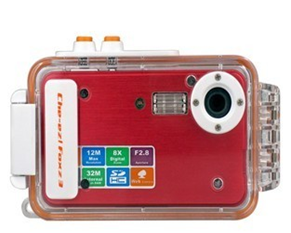
Digital camera - Water proof 5mp digital camera

Water proof 5mp digital camera

Introduction: Manufacturer Specifications Water proof 5mp digital camera 
Main Function: Waterproof digital camera
Materials: Black all-metal camera, translucent waterproof case

LCD screen: 2 Inch LTPS TFT LCD
Storage media:
Internal: 32MB
External: SD Card (8GB Max)

Lens:
F2.8, f=7.23mm
Zoom: 8x Digital
Shutter: 1/10 ~ 1/1000 sec
Sensor sensitivity: Auto

Picture Camera
- Image Format: JPEG
- Resolution: 12MP (Interpolation), 5MP (Native), 3MP, 1MP, VGA
- Image Quality (compression): Super Fine, Fine, Normal
- Snapshot Options: Metering, Timer, Continuous Shot
- Picture Settings: Effects, White Balance, Date Stamp
- Flash: Auto, ON, OFF
- EV: 12 steps (+2 to -2)
- Banding: 50Hz, 60Hz

Video Camera
- Recording Format: AVI
- Resolution: 640x480, 320x240 (Selectable 30/15 FPS)
- Video Settings: Digital Zoom, White Balance
- Banding: 50Hz, 60Hz

Power Supply: Li-ion Battery (recharge via USB)

PC Interface: USB

Compatible Systems for file transfer via USB : Windows 98SE, 2000, NT, XP, Vista (32 bit version only) , Windows7, Mac OS X+

Dimensions: 130mm x 38mm x 77mm (L x W x D) - with all weather case on

Product Notes
Internal photo and video management - delete, lock, review, resize
Lanyard slot
Package Contents
Model CVFU-K02-Black Waterproof Digital Camera
North pole wrist strap

Driver CD
User Manual - English
Mini-USB to USB cable

View Detail to Buy  :  Water proof 5mp digital camera

Monday, June 8, 2009

ASUS Eee PC 1000HE 10-Inch Netbook

ASUS Eee PC 1000HE 10-Inch Netbook (1.66 GHz Intel Atom N280 Processor, 1 GB RAM, 160 GB Hard Drive, 10 GB Eee Storage, Bluetooth, XP Home, 9.5 Hour Battery Life) Black

ASUS Eee PC 1000HE 10-Inch Netbook (1.66 GHz Intel Atom N280 Processor, 1 GB RAM, 160 GB Hard Drive, 10 GB Eee Storage, Bluetooth, XP Home, 9.5 Hour Battery Life) Black

The Eee PC 1000HE by Asus comes in Fine Ebony style that has a much longer battery life than previous models, up to 9 hours with the help of the new Intel N280 processor and Asus Super Hybrid Engine battery technology. The Eee PC has a sturdy LED backlit display with a high-resolution screen. At 1024 x 600 pixels, images are clear and sharp, making it more comfortable on the eyes reading and editing documents. Typing has also gotten easier with the new chicklet keyboard, which gives you wide keys that are spread out to help prevent mistyping. On the top of this screen is the 1.3 Megapixel Webcamera that works synchronously with the 802.11N (2.4GHz only) wireless to provide web conferencing anywhere, anytime for easier web communications and increased work efficiency. To complete the wireless package you also get Bluetooth that allows you to easily connect wireless with Bluetooth headsets or mouse for added comfort and use.

ASUS Eee PC 1000HE 10-Inch Netbook (1.66 GHz Intel Atom N280 Processor, 1 GB RAM, 160 GB Hard Drive, 10 GB Eee Storage, Bluetooth, XP Home, 9.5 Hour Battery Life) BlackStore all your favorite music, video and personal files on the 160GB hard drive and when you need additional space or some way to backup, you can do it with the additional 10GB Eee Online storage. Preinstalled on the Eee PC to provide you a familiar interface is Microsoft's Windows XP Home, Windows Live Messenger and Works for numerous office applications, that allows anyone to learn, work and play. With all of these features the Asus Eee PC makes for a fantastic purchase as a well-equipped second notebook or a Web access tool, so beat the crowds, and get yours today before they sell out! 10 LCD WSVGA (1024 x 600) LED Backlight Display Intel UMA Graphics Card 1.3 Megapixel Webcamera and Digital Array Microphone WiFi 802.11b/g/n (draft n is 2.4GHz only) Wireless Bluetooth 10/100Mbps LAN Stereo Speakers Memory Card Slot - MultiMedia Card (MMC), Secure Digital (SD) Card, SDHC Connections - 3 x USB, VGA, Headphone, Microphone, RJ-45 (LAN) Approximate Unit Dimensions - 10.47 (W) x 7.53 (D) x 1.12 ~ 1.50 (H) Approximat

Catapault to the forefront of technology with Eee PC 1000HE, the first netbook to have the Intel Atom N280 processor. With up to 9.5 hours of battery life, the 1000HE enables you to bring internet and multimedia wherever you go, without a power cord. Furthermore, its 10-inch display, 3.2 pound lightweight chassis, flush fitting battery pack, and large ergonomic chiclet keyboard will allow you to work or travel in absolute comfort for hours on end. Its generous 160 GB of built-in storage—along with an additional 10 GB of Eee Online Storage—will enable you to store, share and access your important data anytime, anywhere.

Eee PC 1000HE - The Ultimate Road WarriorKey Features

    • Up to 9.5 hours battery life
    • First netbook with the Intel Atom N280 processor (667MHz FSB)
    • 10-inch screen & large chiclet keyboard for comfort
    • 160GB hard disk drive plus 10 GB Eee online storage
    • Built-in 802.11b/g/n Wi-Fi and Bluetooth for easy wireless connectivity
    • Multi-touch touchpad for ease of use
    • Learn More

    Large LED-Backlit Screen and Chiclet-style Keyboard for Comfortable Use

    Vibrant Screen and Stylish KeyboardA brilliant 10-inch LED-backlit widescreen display makes reading documents and viewing multimedia files more comfortable.

    This latest generation of LED backlit technology allows for ultra-thin, ultra-bright and energy-efficient display allowing outstanding portability and versatility.

    1024 x 600 resolution allows you to view a single page without often needing to scroll left or right.

    More Details :

    Check Last Price | More Details | Shop Here

    Sunday, May 24, 2009

    Good Smartphone that Has its quirks - HTC FUZE Phone, Black (AT&T)

    HTC FUZE Phone, Black (AT&T)This AT&T phone can handle high-speed data connectivity via AT&T's 3G mobile broadband data network, which is available in most major metropolitan areas. The AT&T 3G network uses the dual-band UMTS 850/1900 MHz network, and this phone is also compatible with 2100 MHz 3G networks (found in international territories). The AT&T 3G network provides download speeds ranging from 700 Kbps to 1.7 Mbps, and upload speeds ranging from 500 Kbps to 1.2 Mbps. This makes it possible to enjoy a variety of feature-rich wireless multimedia services, and it gives you the advantage of offering simultaneous voice and data services. (For use outside the United States, an AT&T international data plan is recommended.)

    The phone has a built-in web browser for MEdia Net downloads and mobile web browsing. AT&T's MEdia Net service enables you to receive and send emails, read news headlines, get weather updates, download games and ringtones, and more.

    Phone Features
    HTC FUZE Phone, Black (AT&T)With the TouchFLO 3D interface, HTC has taken a great leap forward in touchscreen innovation. It's designed for one-hand operation using simple, gesture-based navigation, allowing you to simply touch, hold and slide along the screen tabs. A quick slide on the home screen quickly activates the most used features such as e-mail, text messaging, music player and camera. This instinctive interface extends to the powerful Web browser, where a useful "zoom in, zoom out" feature makes it especially easy to access the Web via the included Opera browser, which provides for desktop-like Web page renderings and user interactions. An integrated accelerometer senses when you change the position of the phone from portrait to landscape viewing, and it auto-rotates the screen's orientation.

    The HTC Fuze features a sharp, 262K-color 2.8-inch VGA touchscreen (480 x 640 pixels) for touch-sensitive navigation control, complete with three-dimensional animated transitions. For email, messaging and other data input, the HTC Fuze also comes equipped with a full QWERTY keyboard that slides out from the smartphone's side.

    Business users can choose from several popular platforms to access your corporate e-mail. The Windows Mobile 6.1 Professional platform offers seamless integration with Microsoft Outlook information including email, contacts, calendar and to-do lists. Additionally, Good Mobile Messaging and BlackBerry Connect compatibility will be offered late in 2008, while personal email can easily be taken mobile using AT&T's popular Xpress Mail service. You can access and edit email attachments using mobile versions of Microsoft Word, Excel, OneNote and PowerPoint.

    Western Digital My Book Essential Edition 1 TB USB 2.0   External Hard Drive WDH1U10000N In addition, the HTC Fuze supports scores of industry-specific applications as well as Microsoft System Center Mobile Device Manager (MDM), an enterprise-grade mobile device management solution that also provides security, mobile Virtual Private Network (VPN) and software distribution for Windows Mobile devices enabled for Windows Mobile 6.1.

    This phone provides Bluetooth version 2.0 wireless connectivity with EDR (enhanced data rate), and includes profiles for communication headset, handsfree car kits, and audio/video remote control. With the A2DP Bluetooth profile, you can stream your music to a pair of compatible Bluetooth stereo headphones. You'll also be able to access open Wi-Fi networks in offices and hotspots via the integrated 802.11b/g wireless connectivity.

    Other features include:

    • 3.2-megapixel camera with autofocus on the back of the phone, additional VGA camera on the front of the phone for video conferencing
    • Video capture up to CIF resolution (352 x 288 pixels)
    • Windows Media Player compatible with MP3, AAC, AAC+, WMA, WAV file formats
    • 512 MB of ROM, 288 MB of RAM
    • Support for polyphonic ringtones as well as real-music ringers
    • Speaker-Independent Voice Dialing: Say the name of any entry in your phone book and the number is dialed automatically without using the keypad. This feature is speaker-independent, so there is no need to train the phone to respond to any one person's voice. Receive an audible status report of your phone/s coverage, signal strength, and battery strength.
    • MicroSD memory card expansion (up to 32 GB capacities)
    • USB 2.0 connectivity with mass storage capabilities
    • Bluetooth version 2.0+EDR with the following profiles: A2DP (stereo music streaming), AVRC (remote control), HFP (hands-free car kits), HSP (communication headsets), BPP (basic printing profile for text, email), DUN (dial-up networking), FTP (file transfer), HID (support for mice or joysticks), OPP (object push for business cards, calendar items, and pictures), PAN (personal area networking), PBA (transfer contacts)

    Buy This Product and Related Accessories by

    Check Last Price | More Details | Shop Here