Showing posts with label Android. Show all posts

Monday, July 4, 2011

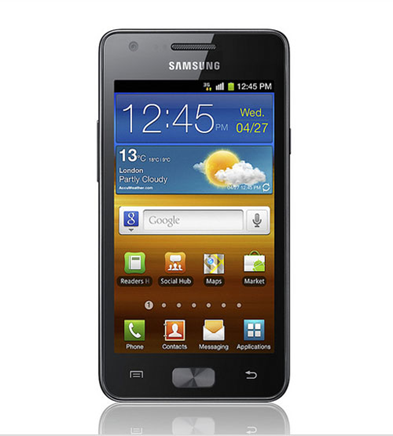
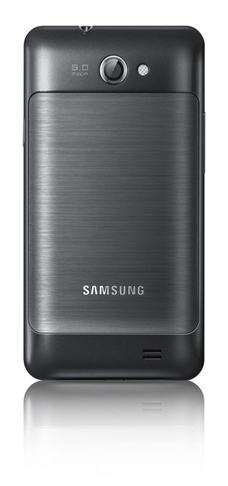
Samsung Galaxy Z I9103 Mobile Android 4.2 Inch with Dual cores.

Samsung Galaxy Z I9103  is the latest product variants with 4.2 inch LCD screen-SC and 2 Tegra chipset with dual-core Cortex-A 1GHz. 4.2-inch screen from Samsung Galaxy Z I9103 has a WVGA resolution and use the LCD instead of SC-SuperAMOLED size 125.3 x 66.1 x 9.5 mm and weighs 135g which specifications have not beat the S Galaxy II butstill quite impressive ..

Samsung Galaxy Z I9103 is powered by Tegra processor 2 is not Exynos of Samsung and its 5MP camera is only capable of recording 720p video is not Full HD, which was a bit disappointing if you expect to record 1080p video. Samsung Galaxy Z I9103 has a built-in 8GB of expandable memory via microSD slot.

image

image

Samsung Galaxy Z I9103 :

  1. General: GSM 850/900/1800/1900 MHz, 3G HSPA
  2. The form factor: touchscreen bar
  3. Dimensions: 125 x 66.1 x 9.5 mm, 135g
  4. Display: 4.2 "SC-16M-color LCD capacitive touchscreen, 480 x 800 pixels
  5. CPU: Dual-core 1GHz ARM Cortex-A9 processor, the GeForce GPU, Tegra 2 chipset
  6. Memory: 1GB RAM, 2GB ROM, 8GB of storage, microSD card slot
  7. OS: Android OS, v2.3.3 Gingerbreadwith TouchWiz 4.0
  8. Camera: 5 megapixel auto-focus camera with LED flash, face detection, geo-tagging; 1.3MP front-facing camera
  9. Video recording: Video recording 720p
  10. Connectivity: Wi-Fi b / g / n, Bluetooth 2.1 with A2DP, standard microUSB port, GPS receiver with A-GPS, 3.5mm audio jack, FM radio
  11. Battery: 1650mAh
  12. Misc: Built-in accelerometer, multi-touch input, proximity sensor, inputsSwype text, Office document viewer / editor

Friday, July 1, 2011

No Gravity Android MOBILE GAME Download

No Gravity v1.0.7
Are you brave enough to play No Gravity? You’ll need steady nerves and a strong heart to fly around dangerous obstacles, face hostile environments and use deadly weapons to accomplish your missions and protect your people. Hurry, download this Android devices version of the PSP favorite, before it’s too late.

In a distant future, spread across thousands of colonies, the empire is under attack from a mysterious, unknown sickness that is affecting people’s minds. So far, you’ve been able to remain healthy but you don’t know for how much longer.??As one of the few survivors of this bewildering plague, it’s up to you to seek out and destroy the enemy that unleashed this madness. If you don’t, there remains no hope for your planet or your people. Are you prepared to tackle 31 missions and destroy the heinous foe???This is not a job for wimps.

image

image

No Gravity Android MOBILE GAME Download here : http://www.mediafire.com/?luj9ebktt81kzsp

Wednesday, June 29, 2011

Figure Prototype 'secrets revealed' Nokia Android

image

After choosing WP 7 as the main operating system for Nokia smartphones, which had been made dashed hopes of many people who want to see how this Nokia smartphone if it comes with the Android OS.

However, thanks to the prototype were posted on China-based sites, Weibo, recently 'leaked' at least give us the opportunity to catch a glimpse of Nokia's smartphones run the systemAndroid operation.

image

N9 prototype that resembles the recently announced several days ago was seen running the Android operating system 2.3 aka Gingerbread. But if the look of the icon size is presented, likely higher screen resolution of WVGA.

If judging from the picture presented looks so convincing. Even so, conclusions that lead to the certainty of a prototype Nokia is runningAndroid OS could not even get.

Tuesday, June 28, 2011

Nokia N9, Full Swipe Based Meego

image

After a long-awaited, finally Nokia N9, Meego-based smartphones from Nokia officially introduced recently. With his official announcement is no doubt some of the security features of this smartphone is finally revealed.

Nokia N9 present to introduce an innovative new design, which replaces the home button with a simple motion:swipe. No matter where you are in an application, swipe from the edge of the screen will take you to the main screen.

Three main screen of the user interface is designed to provide quick access to things that are most important people are doing with a phone: use the application, keep up-to-date with notifications and social networking, and switching between activities.

image

image

image

The design of the Nokia N9 industry is an example of the manufacture and exceptional art of a product. The body is made of a single molded polycarbonate with high precision and flowing gracefully into the glass which is also formed with the beautiful. Black in appearance and laminated to make the user interface look like floating on the surface of this phone.

"With NokiaN9, we want to design a better way of using a mobile phone. For this we innovate in the design of hardware and software. We changed the way of thinking of a home key to a simple movement, "said Martko Ahtisaari, Nokia's Head of Design.

Camera 8 MP Carl Zeiss auto-focus on the N9 is able to capture HD quality video. Not quite up there, the lensare great at N9 kemera also allows the performance of the camera still look good, even in low-level lighting conditions. As a result Nokia N9 was claimed as one of the best camera phones ever produced.

While measuring 3.9 inch AMOLED screen with a resolution of 854x480 pixels which dominates the front of the N9 is said to made of scratch-resistant glass and curved.

Nokia N9 alsocomes with various features such as the latest chic Near Field Communication (NFC) which allows users to easily variety of pictures and video between devices by touching together.

Interestingly, Nokia N9 is also claimed as the world's first smartphone that comes with support for Dolby ® Digital Plus decoding and Dolby Headphone, the user can feel the surround soundissued this smartphone.

Nokia N9 was originally going to come with three colors namely black, blue, red and purple with 2 memory capacity options: 16GB and 64GB and 1GB of RAM.

Specifications:

  1. Network: 2G Network GSM 850 / 900 / 1800 / 1900; 3G HSDPA 850 / 900 / 1700 / 1900 / 2100;
  2. Dimensions: 116.5 x 61.2 x 12.1 mm, 76 cc Weight: 135 grams;
  3. Screen: 3.9 inch, AMOLED capacitive touchscreen, 16M colors, 480 x 854 pixels, Gorilla glass display, Anti-glare polariser, Multi-touch input method, Proximity sensor for auto turn-off, Accelerometer sensor for auto-rotate the UI;
  4. Camera:8 MP, 3264x2448 pixels, Carl Zeiss optics, autofocus, dual LED flash, Geo-tagging, face detection, touch-focus, video 720p @ 30fps;
  5. Memory: 16 / 64 GB storage, 1 GB of RAM, microSD up to 32GB;
  6. Connectivity: Wi-Fi 802.11 a / b / g / n, Bluetooth v2.1 with A2DP, EDR, 3G HSDPA, 14.4 Mbps; HSUPA, 5.7 Mbps;
  7. CPU: 1GHz Cortex A8 CPU, PowerVR SGX530 GPU, TI OMAP 3630 chipset;
  8. Operating System: OS MeeGo,v1.2 Harmattan;
  9. Messaging: SMS (threaded view), MMS, Email, Push Email, IM
  10. Browser: WAP 2.0/xHTML, HTML, RSS feeds 
  11. GPS: A-GPS support; Ovi Maps;
  12. Java: MIDP 2.1
  13. Other Features: microSIM card support only, SNS integration, Active noise cancellation with dedicated mic, Digital compass, TV-out (720p video) via HDMI and composite, NFC support, Dolby Digital Plus via HDMI, MP3/WAV/eAAC + / WMA / FLACplayer, MP4/H.264/H.263/WMV player, Document editor (Word, Excel, PowerPoint), PDF viewer, Video / Photo editor, Voice memo / command / dial, Predictive text input (Swype), audio jack 3.5 mm, Dolby Mobile sound enhancement, Dolby Headphone support;
  14. Battery: Li-Ion 1450 mAh (BV-5JW)

Monday, June 27, 2011

Sony Ericsson Xperia Active, Sport appearance Android Smartphone

image

In addition to introducing Xperia Ray, in the event CommunicAsia 2011, the Japanese-Swedish joint venture vendor also released Xperia Active. An Android smartphone is intended for users who have a sporty lifestyle.

No wonder the active Xperia claimed to have advantages such as anti against dust and water plus scratch-resistant display with support for 'wet finger tracking'. As a result the touch screen can stillworks well even though the user's finger in a state of sweat.

To give the best performance, Xperia active armed with a 1 GHz processor Snapdragon. 3-inch screen sizes Reality tech Mobile Display BRAVIA Engine, with HVGA resolution (480 x 320 pixels).

image

For business image appearance Xperia Active equipped with a 5 MP camera with LED flash and can record video at 720p. Capacity of 320 MB of internal memory which can be expanded via microSD cards.

Connectivity offered Xperia sector is also very active in the presence of adequate support for Wireless N with DLNA, quad-band GSM, GPS, digital compass, Bluetooth, and 3.5 mm audio jack.

For systemsoprerasi, Xperia active running Android v2.3 aka Gingerbread and will be packaged with a variety of sporting applications. The phone also will be compatible with ANT + technology to monitor heart rate in real-time.

With its advantages as a mobile phone that is resistant to dust and water, able to remain active Xperia live in a depth of 1 m of water for half an hour very well.

Sony Ericssonactive would glide in the third quarter of this year. Only quite unfortunate, what price tag of this smartphone is not yet known. So, we wait on the game.

Specifications:

  1. Networks: 2G GSM 850 / 900 / 1800 / 1900 3G HSDPA 900 / 2100 HSDPA 1900 / 2100 / 800;
  2. Dimensions: 92 x 55 x 16.5 mm; Weight: 110.8 grams;
  3. Screen: 3.0 inch, LED-backlit LCD, capacitive touchscreen, 16M colors, 320 x 480 pixels, Accelerometer sensor for auto-rotate, Bravia Mobile Engine, Multi-touch input method, Proximity sensor for auto turn-off, touch sensitive controls, Scratch-resistantdisplays, Timescape UI;
  4. Camera: 5 MP, 2592х1944 pixels, autofocus, LED flash, Touch-focus, geo-tagging, face detection, image stabilization, video @ 720p, the video light;
  5. Memory: 320 MB of storage, microSD up to 32GB, 2GB included;
  6. Connectivity: Wi-Fi 802.11 b / g / n, DLNA, Wi-Fi hotspots, 3G HSDPA, HSUPA, v2.0 microUSB;
  7. CPU: Scorpion 1GHz processor;
  8. Operating System: Android OS, v2.3 (Gingerbread);
  9. Messaging: SMS (threaded view), MMS, Email, Push Email, IM
  10. Browser: HTML
  11. Radio: Stereo FM radio with RDS
  12. GPS: A-GPS support
  13. Java: Java MIDP emulator via
  14. Other features: Dust and water resistant, Flashlight, Digital compass, SNS integration, MP4/H.263/H.264 player, MP3/eAAC + / WMA / WAV player, TrackID music recognition, Google Search, Maps, Gmail, YouTube, Calendar , Google Talk, Documentviewer, Voice memo, Predictive text input, 3.5 mm audio jack;
  15. Battery: Li-Ion 1200 mAh.

Monday, June 13, 2011

10 Mobile with the fastest Internet Access 2011

Manufacturers of mobile phones are competing to attract consumers by making cell phones that are able to meet the needs of its customers by improving the speed internet on hp product.

And noted there are 10 phones with the fastest internet connection (Forbes):

1.Asus P565

asus phone

2.BlackBerry Bold

blackberry mobile phone

3.HTC Imagio

HTC imagio

4.iPhone 3G S

Iphone

5.Palm Pre

Palm pre

6.Samsung 360 H1

Samsung

7.Samsung Jet

Samsung jet

8.Samsung HD Omnia

samsung omnia

9.Sony Satio

sony satio

10.Toshiba TG01 (STF)

toshiba TG01

APRSdroid Show Your Route in Real Time

APRSdroid

For those of you who have phones with Android or the iPhone operating system, now you can use an application that allows you to display your GPS position, as for software or applications used are APRSdroid, you can find and download it here

https: / / github.com/ge0rg/aprsdroid.

Installation APRSdroid

Once you get the software please you install on your mobile, if installed it on your phone screen will appear Icon APRSdroid:

1

Pictures Main 1.Your Android Systems

Click on Icon APRSdroid, To run this application, and on-screen gadget there is shown a window like this:

1

Figure 2. Tracking Menu

From the Tracking window, Click the Menu button on the gadget,

The next window will be shown as below:

1

Figure 3. Main Menu Settings

Select Preferences, to apply the settings on your aprsdroid Configuration:

1

Figure 4.Aprsdroid Preferences

Perform the settings on several parameters:

Amateur Radio

  • Callsign, enter your callsign here
  • Passcode, enter your passcode
  • Request Pascode, ask for your passcode here if your do not have it

APRS Settings

  • SSID, enter your station ssid, for example 9 for the mobile station
  • APRS Symbol, symbol input your station to be shown on the map

1

1

1

Figure 5.Symbol APRS

  • Status Message, the input status of your message, or your name here

Location Settings

  • Minimum Update Time, enter the station every few minutes you want to transmit your GPS position
  • Minimum Update Distance, enter any number of miles, your position will be in the Update
  • Await Speed ​​& Bearing. Check the options on the right, for the position of your data can be displayed accurately via GPS
  • Use the Network Location, Check on this option if you want to adjust your position according to the location of your BTS

Incoming Filter (TCP Only)

  • Neighbor Radius

Networking

  • Connection Protocols, use the UPD or HTTP
  • Server, use the default server, svr.aprs-is.net

If all the parameters already gives a chance, please exit from this menu, then save the results of your settings,

1

Figure 6.Jendela Tracking

Tracking Click the Start button, to run your APRSdroid, the screen will display the connection information from your gadget to APRS servers.

1

Figure 7.Tracking Packet

To see the MAP, Click on the menu, select Show Map

1

Figure 8.Map APRS

If your station appear on the map, it means that you do have the settings are on the right.

1

Figure 9.Tracking Your Trip

Sample folder you travel if the station managed to send the packet to the server APRS

To view the MAP from the menu that are here can also be done by viewing the information from the server http://aprs.fi

Sunday, June 12, 2011

10 Android Features that the iPhone Doesn’t Have

10. Alternate Keyboards

From text predictors like Swiftkey to the innovative like Swype and the downright adventurous like 8pen, you have a lot of different keyboard choices on Android. Typing on a tiny phone keyboard isn't anyone's idea of fun, so it's great that Android provides so many options to make it as painless for people as possible, and super easy to install. The iPhone has other keyboards, but they're usually separate apps that require you to import text to another program—it's just the kind of system-level functionality that's hard to get around.

9. Automation

One of the most powerful, useful Android apps around is Tasker, the automation program that lets you turn your phone into a superphone. You can turn settings on and off for certain applications, by location, time of day, and pretty much any other condition you can think of. With the right commands in place, Tasker can access the deepest and darkest settings on your phone, which is something you just can't do on other platforms. Be sure to also check out our second list of Tasker setups, three handy Tasker profiles from our readers, and how to roll your own "Find my iPhone" for Android. Similar apps like the battery-saving JuiceDefender would also fall into this category.

1

8. Custom Home Launchers

While iPhone users can customize their home screen quite a bit if they've jailbroken, they don't allow the kind of customization that you can get on Android with custom home launchers. Third party launchers can add all sorts of extra features to the home screens of your device, like gestures, different kinds of shortucts, and even low-level settings that can help speed up an older phone. Whether you're using the super-fast LauncherPro or the insanely customizable ADWLauncher, third-party launchers add a ton of configuration to your device.

1

7. Widgets

Sure, they take up a bit of space, but there's no substitute for the convenience of having a big weather widget right on your home screen, or a music widget to show you the currently playing track. Even more useful are the to-do list widgets, that take an "in your face" approach to productivity, which is not only effective but necessary from people, as they don't require you to actually look for your to-do list—they're always reminding you of what you need to do. If you've jailbroken, you can get widget-like apps for the iPhone, but you can only put them on your lock screen—not the actual home screens that you're always swiping through.

1

6. Removable Storage and Battery

it isn't part of the Android software, necessarily, but Android's open nature allows for quite a few hardware advantages too—namely the ability to take out, swap, and upgrade your battery and SD card. If you find that you've maxed out the storage on your iPhone, you're pretty much out of luck, whereas with an Android phone you can pop in a new SD card and have gigabytes more storage to play with. Similarly, you can swap out a spare battery for longer trips or even get an extended battery that'll help your phone go longer without charging. Photo by Hiroyuki Takeda.

1

5. Wireless App Installation

Browsing for and discovering new apps should be fun, not challenge to make it through a tiny app store with your sanity intact. The App Store and Cydia App Store aren't exactly fun to browse on your phone, but you either have to download apps on your phone or plug it into iTunes to sync them all over. With the new Android Market, or with third-party sites likeAppBrain, you can find a cool app, hit the install button, and it'll be on your phone the next time you pick it up. It doesn't get much more convenient than that.

4. Custom ROMs

1

While there are a lot of third-party apps that give you advanced features on Android, one of the coolest parts about the entire OS being open source is that people can take it, tweak it all over, and install their version instead of the one that comes with your phone. Whether it's the feature-filled CyanogenMod or the interface-overhauling MIUI ROM, there's little limit to how much you can tweak your Android experience. As with launchers, these give you a lot of system-level tweaks that you just wouldn't be able to get this easily on other platforms—and it puts them easily within users' reach. Whether it's tweaks that speed up your phone or features like FM radio, custom ROMs are without a doubt one of the biggest advantages to Android's openness around.

3. Controlling Your Phone From Your Computer

This one's a little more out there, but we've featured quite a few apps that let you actually control your Android phone from your PC—whether you just want to send texts from Chrome or access any of its other functions right from a web browser. iOS has apps like TeamViewer, which let you access the phone itself, but it's only a screen-sharing app—it doesn't actually let you access the phone's baser functions from another interface, which can be a very overlooked convenience.

1

2. Flash

Say what you want about Flash, but it's everywhere you go, and when you're forced to view the web without it, you realize how much you actually rely on it day-to-day. Whether its accessing fully Flash web sites, watching Flash videos, or playing games like the ones on Kongregate, having Flash installed on your phone and tablet let you access a lot of things you otherwise couldn't have. We may grimace when we hear its name, but it's too prevalent to go without. It just feels like you don't have the whole web at your fingertips.

1

1. True App Integration

1

Google Voice may finally be available for the iPhone, but the experience will never be the same as it is on Android. Other iPhone apps always direct you to the default dialer and visual voicemail apps, so even if you want to use Google Voice full time, you have to manually navigate it to yourself. On Android, apps like Google Voice integrate directly with the operating system—if you want to make calls with Google Voice, every call you make from the phone's dialer goes through Google Voice. When you click on a phone number in your browser or in Google Maps, it goes through Google Voice instead of sending you to the wrong dialer. True app integration like this makes using custom phone, SMS, voicemail, and even browser apps absolutely seamless on Android, which is something you won't find on the more locked-down iPhone platform.

We do love the iPhone here at Lifehacker, but we also love tweaking and hacking our phones into oblivion, and Android just does it better than any other platform. These are just a few of the many tweaks you can make to an Android phone, but they're certainly some of the most special. Got any of your own favorites that weren't featured? Be sure to share them in the comments below.

source: LifeHacker

How Encryption All-Internet Usage On Android Smartphone

If you're phone is rooted and you hate dirty Wi-Fi, this one's for you:..

When you connect to a public Wi-Fi network, your Android phone is susceptible to the same sorts of attacks as a laptop—as demonstrated by the Android data vulnerability exposed a few days ago. The solution to securing your communication is simple: You have to encrypt it. Here's how to set up an SSH tunnel as a cheap, easy method to encrypt all your Android phone's data.

What you'll need:

A rooted Android phone: Your phone needs to be rooted in order to be able to make connections through an SSH tunnel. If you haven't rooted your phone yet, and you're willing to take the leap, hit up our always up-to-date guide to Android rooting to get started.

An SSH server: Ideally this would be rented from a web host online, but it could be any internet-connected computer with an SSH server running, including your home computer.

SSH Tunnel (free from the Android Market)

Why use encryption at all? What's an SSH Tunnel?

Normally, you don't need to worry about encryption on your phone because you're already using your carrier's mobile data connection, which in and of itself is pretty secure already, if only because you're the only person using it. The problem arises when you connect to public Wi-Fi. On public Wi-Fi, anybody can listen in on everyone else's web traffic with the right tools, and in doing so, potentially gain access to things like your social networks, your email, or worse.

SSH Tunneling allows your phone to create a secure, encrypted connection to a server located far away from the public Wi-Fi, and run all your data through that connection (like a tunnel). The Wi-Fi connection you're using may not be secure, but when you're using an SSH tunnel, your data will be. See our previous guide to encrypt your web browsing session using this method on a computer for the desktop version of this guide.

Step One: Find or Set Up an SSH Server

The first thing you'll need to do in order to use an SSH tunnel, is to find a server to connect to from your phone.

Paying for an SSH Server

1

By far, the best option is to buy a monthly web host subscription. There are fast, reliable options to choose from for around $10/mo (or even cheaper). See our list of the five most popular reader-selected web hosts to get an idea of the pricing and options. Any web host will do, so long as it offers SSH access—this is the one thing it must have.

You can find free web hosts, but they tend to be extremely slow and unreliable. There are also "shell accounts," which are basically nothing but SSH accounts on a server; they're cheap, but you're really only saving a couple of dollars compared to the cheaper web hosts, and in my experience they're often not fast enough for our purposes.

You don't need to worry about buying a domain name for your server if you don't want to, since they come with what's called an "access domain." It's basically an ugly URL for your server (an example would be ve.tddlyfzr.vesrv.com), and it's all you need to connect with SSH.

Setting Up SSH on Your Home PC

If you don't feel like paying money for your SSH server, you've also got the option of setting up your own SSH server on your home PC, but it's got major pitfalls that make renting a web host—and spending the cost of two lattes—feel well worth it. When you tunnel through your home PC, the connection speed tends to be dismally slow (all the traffic is going through your home computer, so your speed will bottleneck with the speed of your upload bandwidth), not to mention the fact that the computer needs to be on and connected at all times. You'd also need to set up a service like DynDNS to assign a domain name to your PC and keep track of your home IP address, otherwise you wouldn't know where to connect to while out of the house.

We've got some very in-depth instructions for how to rig your home PC as a media server, which also covers router settings and setting SSH to receive connections. Windows takes a minimal amount of work to install and run SSH, while Linux and Mac should theoretically "just work."

It really is easier and generally better to use a web host if you can. Web hosts have a direct line to the internet, so compared to your home computer, they're incredibly fast, and there's nothing to bother setting up to connect to them with SSH. If, like many Lifehacker readers, you've already got one, then using it won't cost you anything more than you're already paying

Step Two: Set Up the SSH Tunnel App on Your Android

The free SSH Tunnel app does exactly what it sounds like: Creates the encrypted SSH tunnel between your phone and your SSH server, ensuring that all your internet usage is encrypted, even on open, public Wi-Fi networks. Setting it up is easy:

Once you have a server to connect to, simply enter your server's domain as the Host, then enter your SSH username, and your password. Check the boxes that read "Use socks proxy" and "Global Proxy," then flip the "Tunnel Switch" and it connects—dead simple. To make things even easier, the app also has options to reconnect automatically if the connection drops. Now, on all your connections (or just whenever you want to turn it on), all of your Android traffic will be secured, encrypted from prying eyes.

1

source: lifehacker

Saturday, June 11, 2011

Android Freeware. Download Free Software, Games and Apps for Android Phones.

androidAndroid Freeware is delivering you the latest news and reviews about Software, Games and Applications for the Android mobile platform

Established

07.11.2007 by Mobile Network LLC.

About

Android Freeware is delivering you the latest news and reviews about Software, Games and Applications for the Android mobile platform

Company Overview

Lots of free android software, games, enhancements and themes plus much more apps to enjoy on your Android device

Mission

Helping the freeware open source software developers to spread Their great applications to The Android users all around the world.

Products

Please feel free to contact us and submit your new freeware!
http://www.androidfreeware.net/

Web Site

http://www.androidfreeware.net